
Pulling the Thread: Invite Only
Starting with a hunch
Last week, I shared a small phishing campaign encountered during routine monitoring. This post focuses on what came next: how a single artifact can uncover infrastructure, tooling, and ultimately a likely operator.
Both pages in the screenshot share the same filename: invite.php. I was wondering “isn’t this invite.php suspicious? Is it used for legitimate purposes?” What you should do with your assumptions is to:
- Make them clear
- Test them
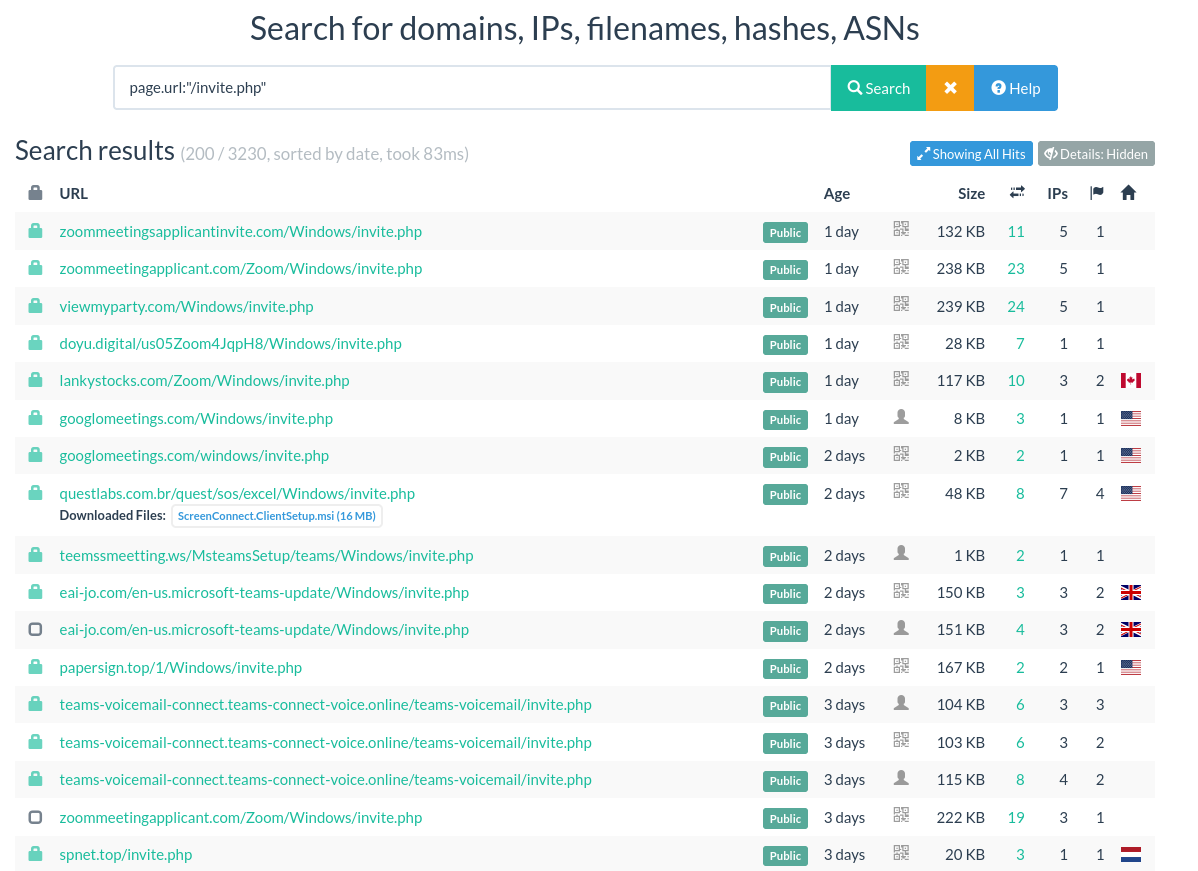
So let’s do it. On urlscan.io (URL scanning service), I got 3230 results for the query page.url:"/invite.php".
Disclaimer: urlscan.io has a bias toward suspicious URL. As it is crowdsourced, so you depend on user submissions, which are biased toward suspicious URLs.
 |
|---|
urlscan.io search for /invite.php |
Looking at the results, you can also see that some URLs have the path: root.tld/Windows/invite.php. Since this path appears multiple times and suggests a structured deployment (/Windows/invite.php), I’ll use it as a starting point to test whether we’re looking at a shared template or infrastructure.
What does the page tell us?
First, we should determine how we would assess that they are—or not—the same page. What I usually do is straightforward: I open the HTML file and look for anything specific. I try not to be too attached to terms related to Microsoft Teams, but more on the structure of the page.
The page has:
- a title: Microsoft Teams Voicemail Update
- a link to a google fonts: Roboto:wght@400;50
- an embedded stylesheet: zoom-blue: #0072c6, text-color: #555, bg-color: #f4f7fa, border-color: #0072c6, button-hover-bg: #0072c6
- a script block
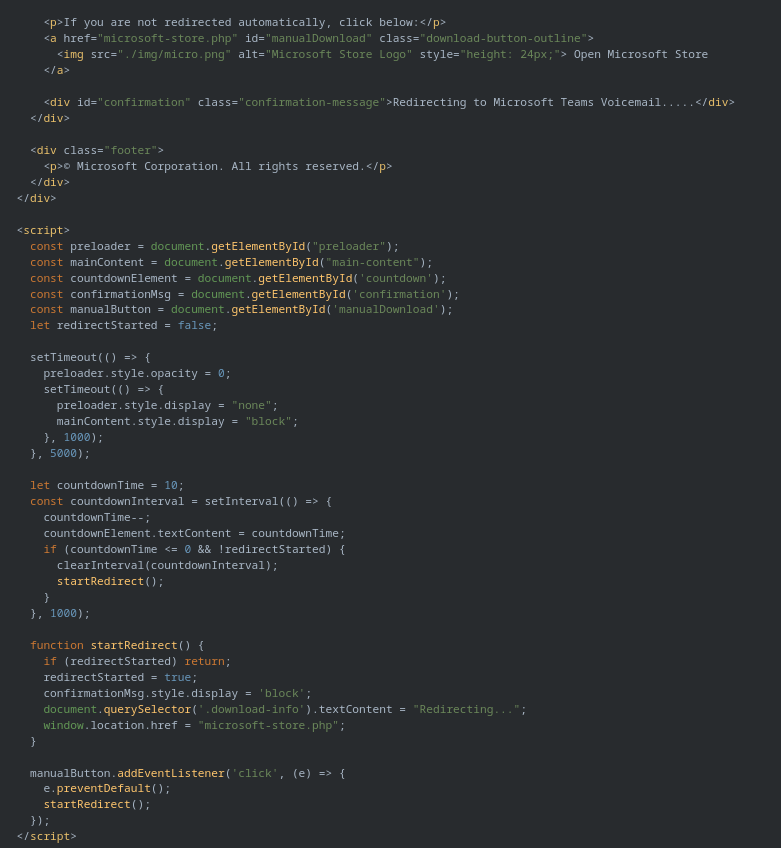
The script starts by initializing variables related to element ID, then a preloader message transition and a redirect countdown. At the end, it calls the function startRedirect which writes “Redirecting” in the download-info element and redirects the user to the page microsoft-store.php.
 |
|---|
invite.php DOM from teams-connect-voice[.]online |
There is a lot more than you can extract. For instance, the manualDownload element has a href to microsoft-store.php and the image is located at ./img/micro.png. All those small elements will become quite handy when we will need to compare with others pages. Taken together, these elements form a reusable fingerprint that can be used for detection or retro-hunting.
Now that we have a clear idea of what to look for, we can start comparing pages. From there, I pick a random urlscan.io result.
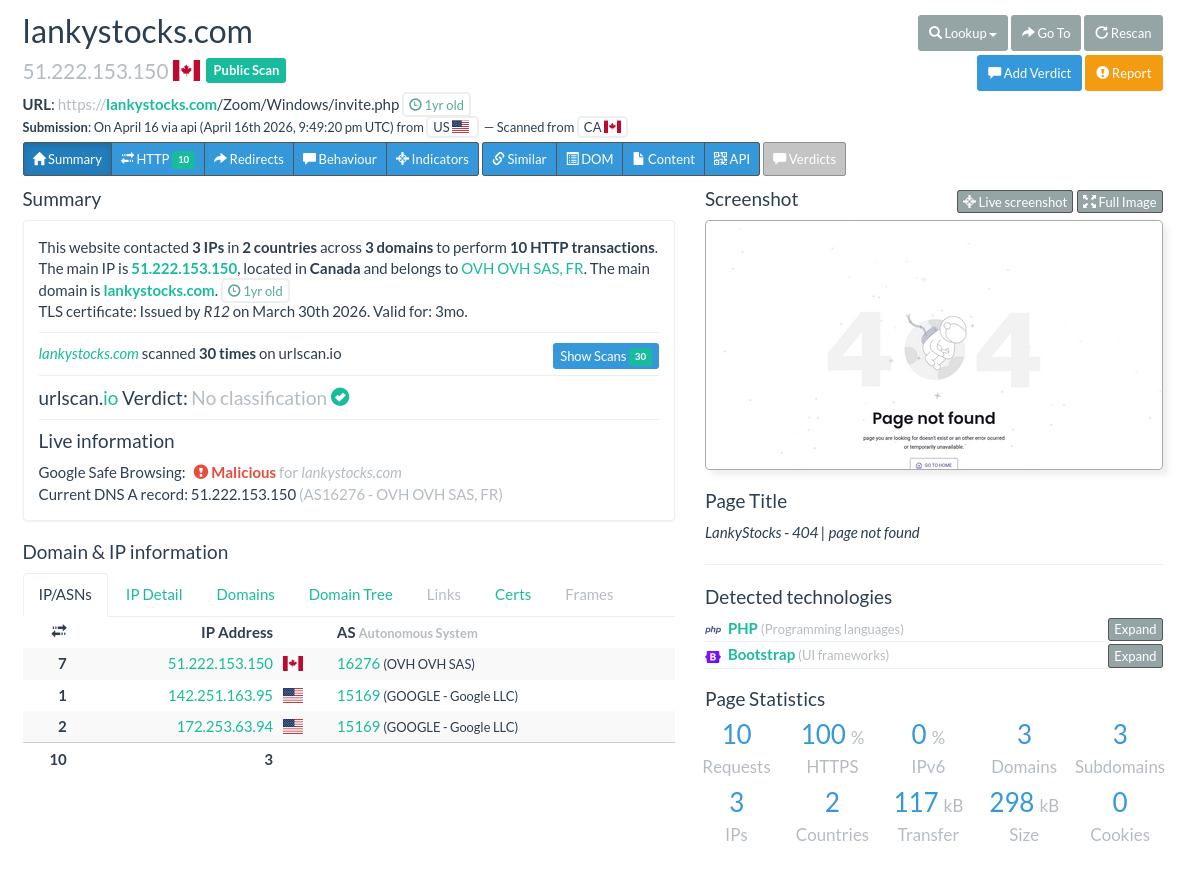
When opening the result from lankystocks[.]com, we see a 404 page. It is common on urlscan.io to have this kind of behavior. urlscan.io performs on-demand scans, so some scans occur after the page or site has already gone offline.
 |
|---|
| 404 page from lankystocks[.]com on urlscan.io. |
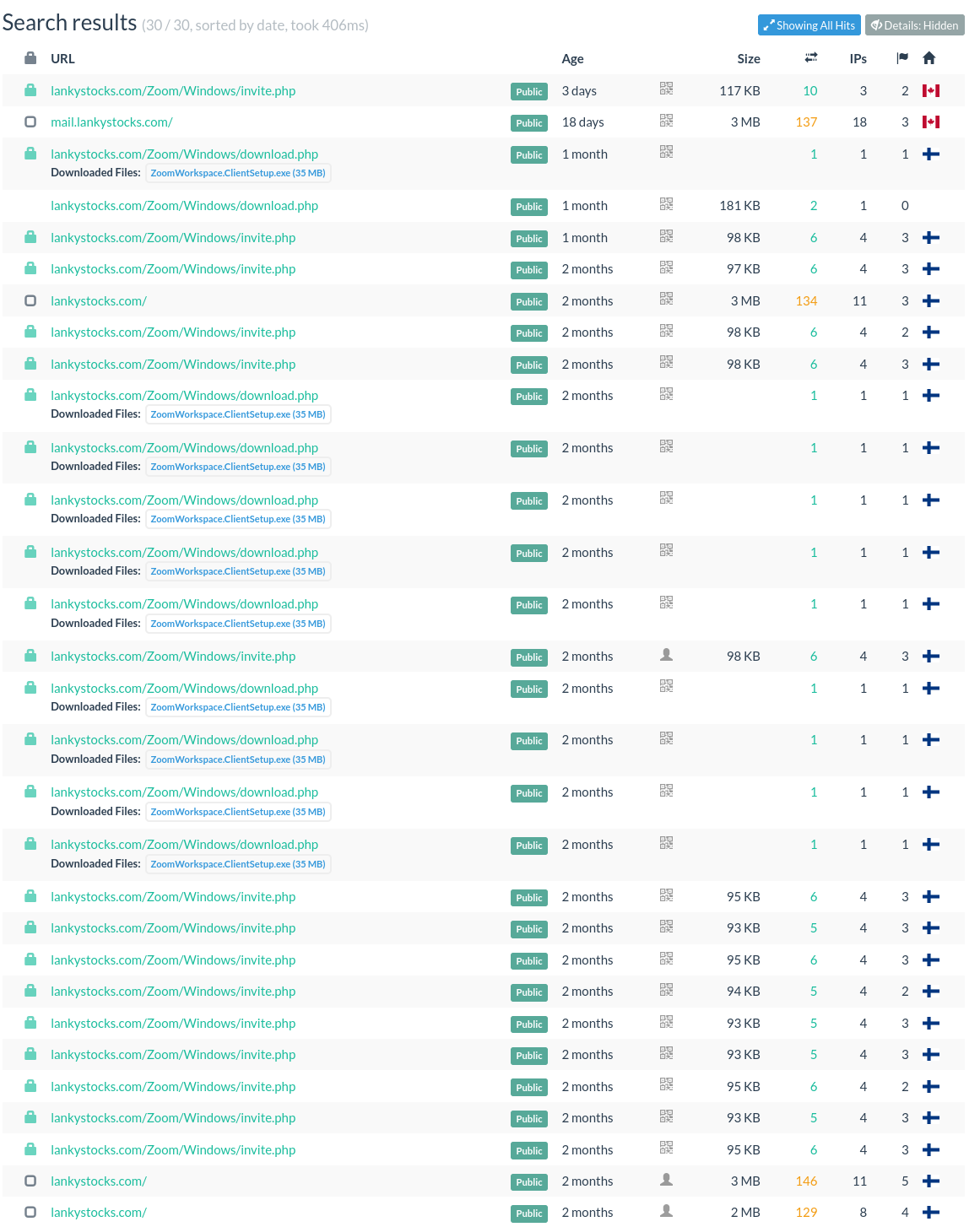
To make sure, always check the full scanning history, and starts from the beginning. This will allow you to get an understanding of what happened on the website according to urlscan.io data. It is important to remember, what you see here is only URLs submitted to urlscan.io, not every page available.
 |
|---|
| lankystocks[.]com scanning history on urlscan.io |
From there, you can see that the domain was first scanned 2 months ago (February 06), and the first URL with invite submitted the a week after, on February 13th. You can also see that the page download.phpdownloads an executable file named ZoomWorkspaceClientSetup.exe(sha256: 5701dabdba685b903a84de6977a9f946accc08acf2111e5d91bc189a83c3faea). Both the file and domains were reported by Microsoft as part of a “Signed malware impersonating workplace apps deploys RMM backdoors”. So we are onto something. But what about this page ?
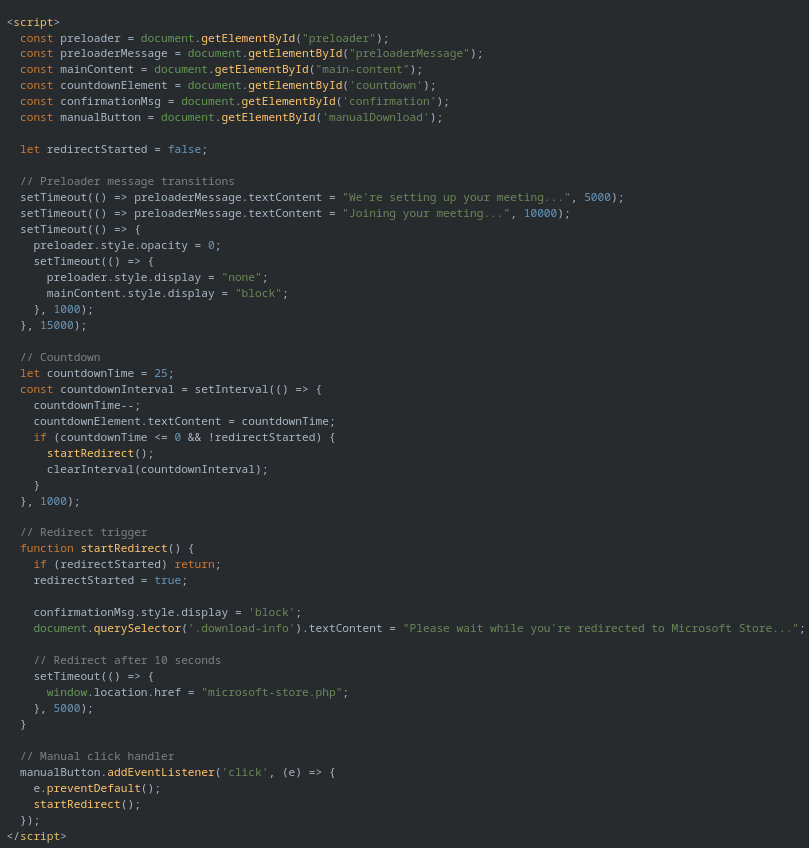
We can see that the title is different (Zoom Client Update). The script block is similar, but this time it has comments and a different preloader message transitions.
 |
|---|
lankystocks[.]com invite.php DOM, this time related to Zoom |
This is clearly the same template, with minor variations. It can be because one of the page was modified by someone to make it easier to manage—which explains the comments—or that on the contrary someone removed comments altogether.
I looked at other HTML documents, and I always found the same page. If it is always the same, you can search for the hash instead of always opening and manually viewing the DOM. I found 252 results with hash:902ca83e4b0047d965ecea1059cd8d2212c386c4751f534cafc9287bc230fa64 for 88 domains. The oldest one is from 9 months ago.
At this stage, we’ve established that multiple domains reuse the same phishing template, suggesting either a shared kit or a coordinated campaign.
Clustering the infrastructure
When you have a lot of data, what is interesting is to create clusters. This allows you to see details under a new light and split the work.
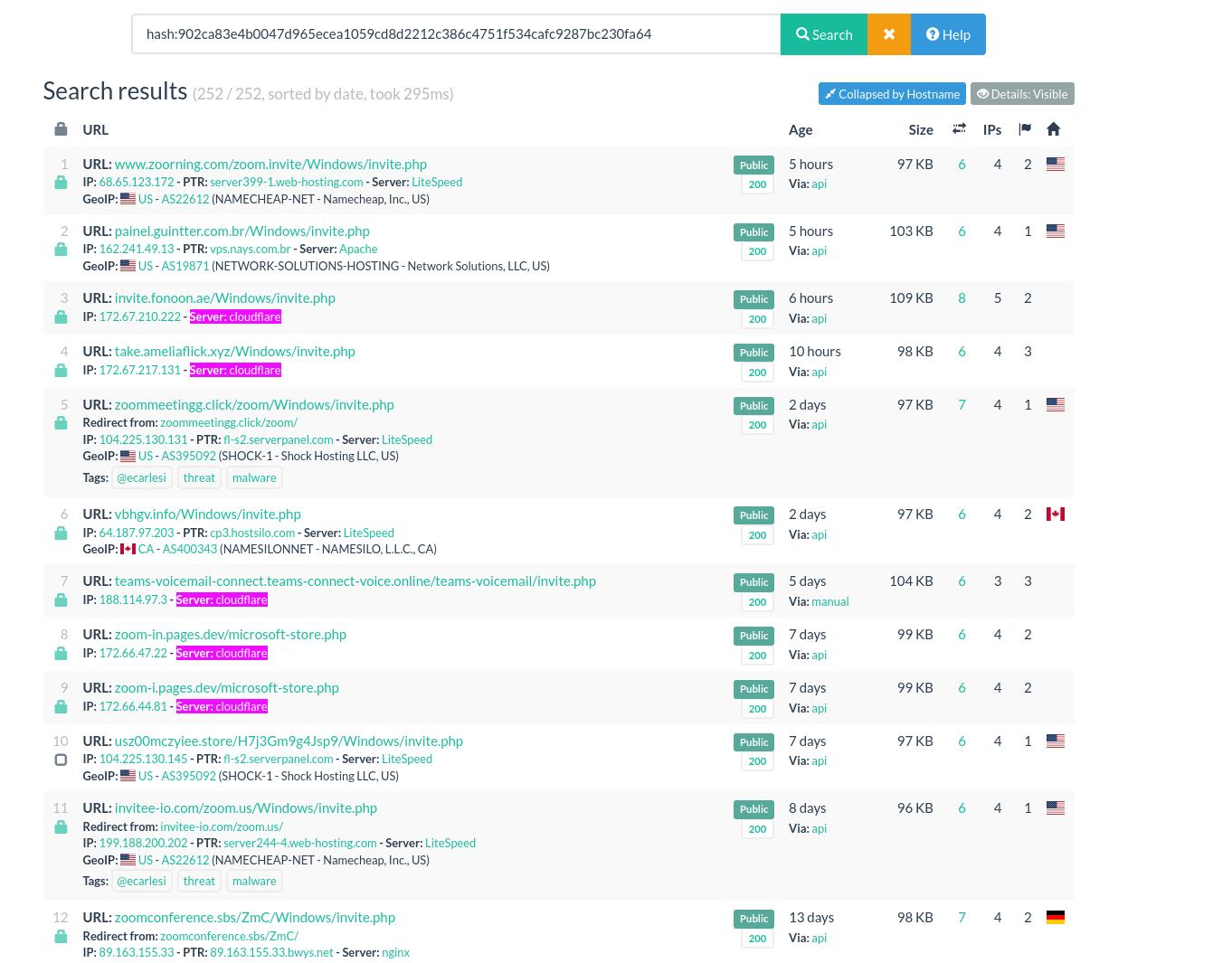
Now let’s cluster based on hosting. As I stated earlier, it is not because the HTML page is the same that it is always the same person—or group of persons—behind. To further our work, we will cluster every page based on hosting behaviors. At some point, it is possible that we regroup clusters together, based on other elements. To make the clustering easier, it is best to set the option “Details: Visible” on urlscan.io. I also collapsed results by Hostname.
Clusters can be quickly identified with a simple search within the page.
 |
|---|
| A simple CTRL+F on urlscan.io is just what you need to make this clusters |
We end up with three main clusters:
- The SHOCK ASN cluster: 47 domains are hosted on this ASN.
- The CloudFlare hosted Cluster, with 17 domains.
- The NameCheap cluster with 4 domains.
The rest of the domains are hosted on ASN, but there are only one or two at a time. Clustering them would take time and create a lot of small clusters. It is something you might want to do if you are concerned about this threat, but I will leave it there in this blogpost.
Clustering gave us a new insight: more than half of the domains we found are shared on the same ASN, which strongly points to a group or individual.
A small OPSEC mistake
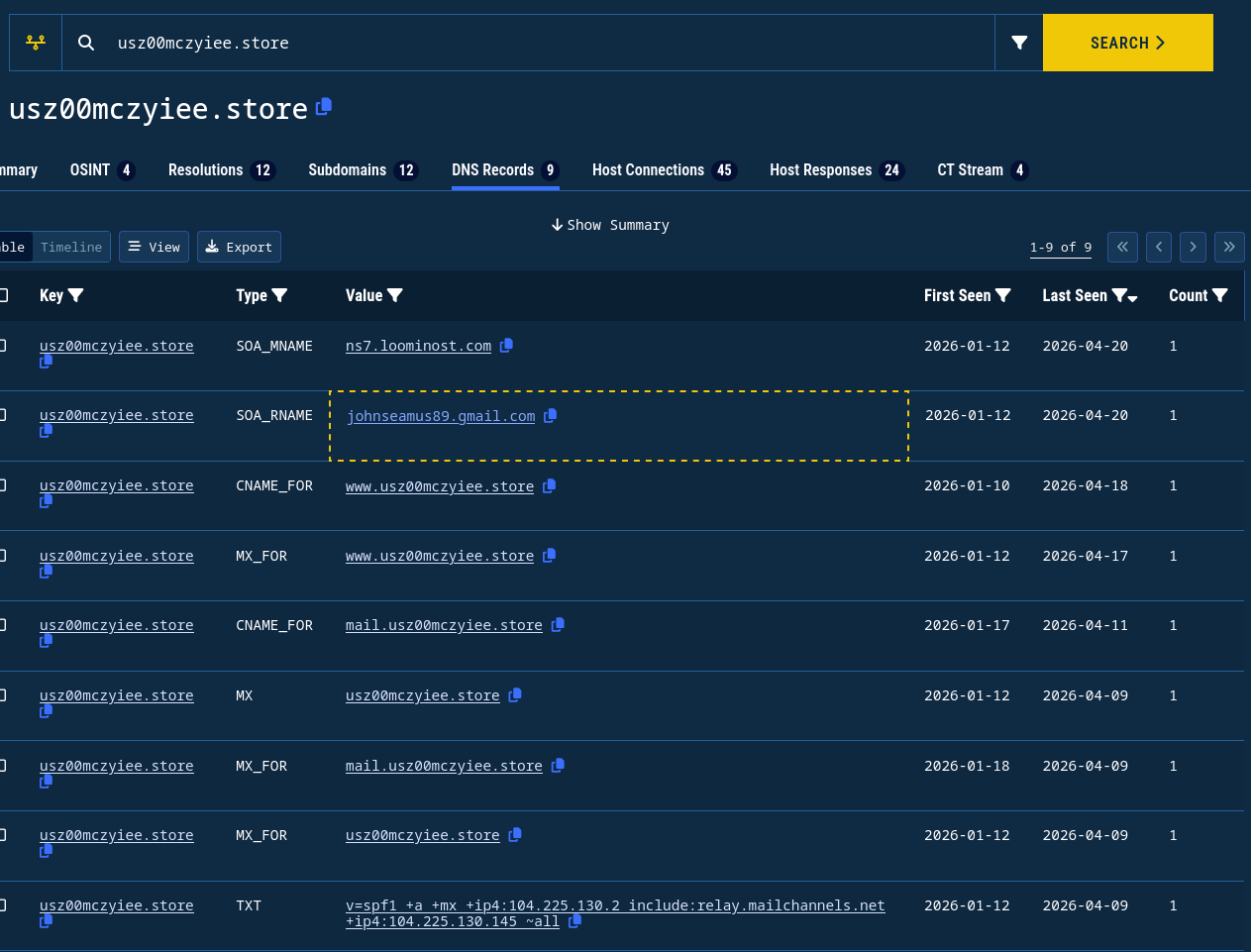
The main interest here is the SHOCK ASN cluster, with more than half domains included in this cluster. Looking at the hosting of some domains on Validin, I found two points of interest.
 |
|---|
| DNS records for usz00mczyiee[.]store on Validin |
In the DNS Start of Authority (SOA) records, you can see that the SOA_MNAME points to ns7.loominost[.]com and that the email johnseamus89@gmail[.]com is used as SOA_RNAME. Sometimes, less experienced operators have so little OPSEC that it makes them a breeze to track. In a previous role, I was able to track a similar individual with this exact technique. He had more than 5 000 domains.
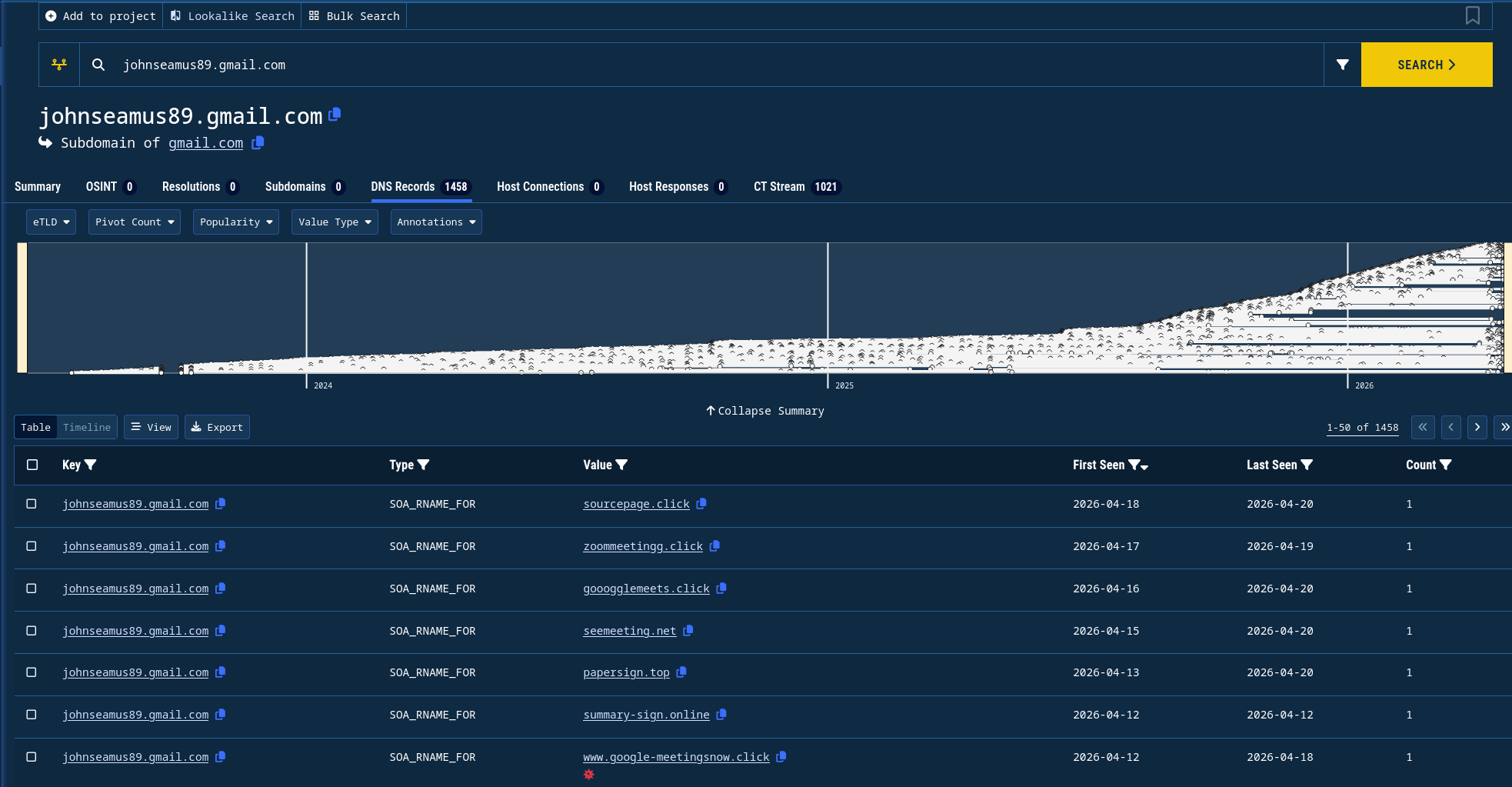
Validin’s data says that the email is related to 1458 domains. By a quick look, I found that the more recent ones all look like ClickFix/Video Conferencing related domains.
 |
|---|
| All domains related to johnseamus89@gmail[.]com according to Validin |
A report from BreakingGlass intelligence mentions the email and its related activities. The report identifies ClickFix domains linked to johnseamus89@gmail[.]com. They also found that loominost[.]com and phishing pages share the same Google Analytics ID: G-XDVX0QEYVC. Finally, it states that the team could not link the email—johnseamus89@gmail[.]com—and the loominost operator with enough confidence. This aligns with their conclusion: at this stage, the link between the email address and the Loominost operator remains unconfirmed.
However, by pivoting further—specifically by correlating the email address with external forum activity—we can introduce an additional layer of context that was not explored in their analysis.
Kevin
At this stage, the infrastructure pivot (SOA email + nameserver) provides a strong lead—but not yet an attribution. To go further, I looked for external references to the email address.
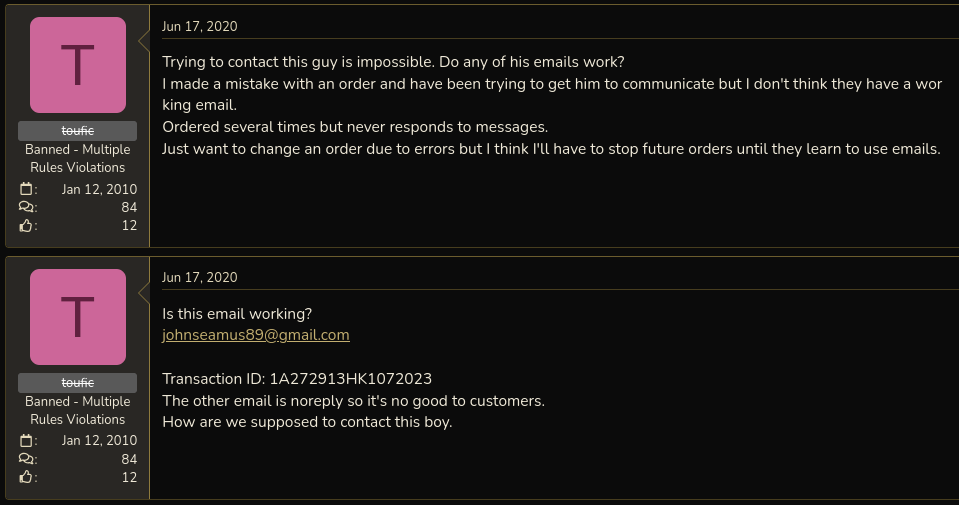
Searching for johnseamus89@gmail[.]com returns a thread on BlackHatWorld[.]com, an internet marketing forum.
 |
|---|
| BlackHatWorld user toufic complains about not being able to reach Kevin with email johnseamus89@gmail[.]com] |
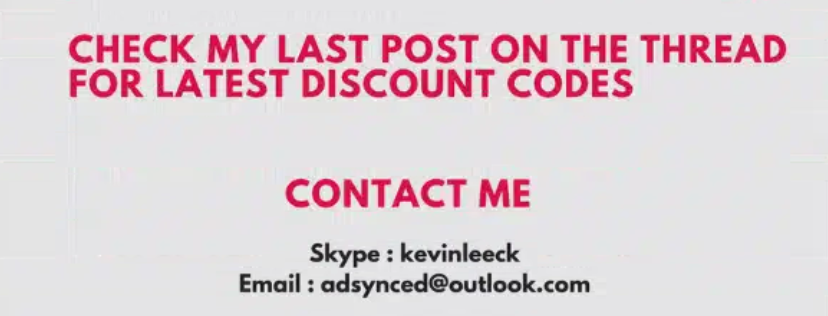
In a thread titled “Kevin’s PBN”, a user references this email address as a contact point for an individual operating under the handle eatingMemory. While forum content should always be treated cautiously, this establishes a potential link between the email observed in DNS records and an online persona. The original post also shares two ways of contacting eatingMemory:
- the skype address kevinleeck
- the email adsynced@outlook.com
 |
|---|
| End of eatingMemory first post on the Kevin’s PBN thread on BlackHatWorld |
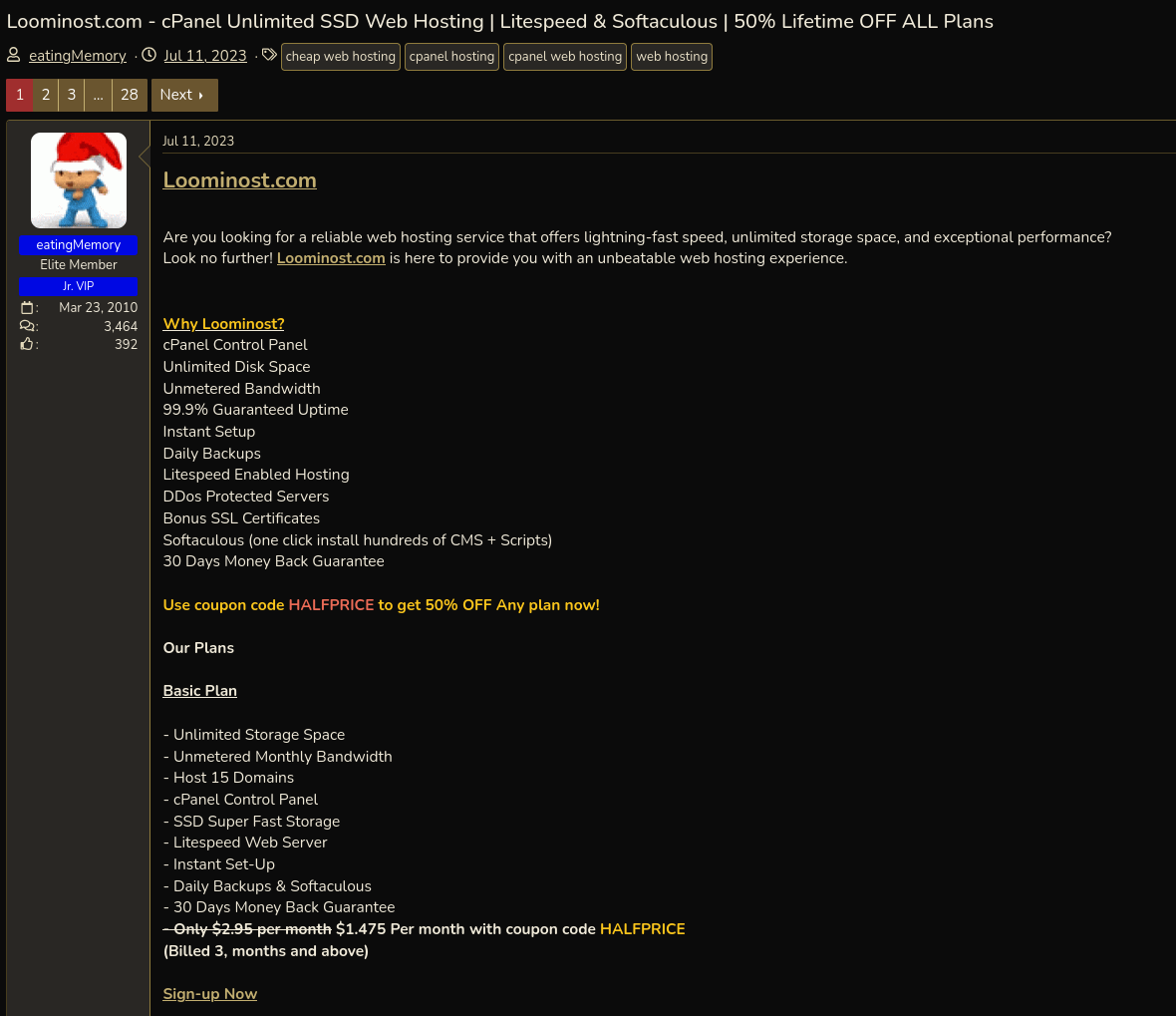
Separately, the same eatingMemory account advertises, on July 11th, 2023, a hosting service named Loominost.
 |
|---|
| eatingMemory post about Loominost on BlackHatWorld |
This is particularly interesting given that:
- the SOA records observed earlier reference ns7.loominost[.]com
- the same infrastructure is tied to phishing domains using the identified template
- the email address appears both in DNS data and in forum discussions referencing eatingMemory
Taken together, these elements suggest that:
- the Loominost service,
- the email address johnseamus89@gmail[.]com,
- and the eatingMemory persona
are likely connected and may be operated by the same individual (referred to as “Kevin” in the forum thread).
While BreakingGlass did not establish a confident link between the email and the Loominost operator, combining infrastructure pivots with forum intelligence provides a stronger—though still circumstantial—case for overlap.
What can be stated with more confidence is the behavioral pattern:
- large-scale domain registration (≈1500 domains linked to the email)
- recurring use of shared phishing templates
- overlap with ClickFix / fake conferencing lures
- continued activity within SEO and marketing forums
This suggests an operator with a background in SEO-driven infrastructure, repurposed for phishing and malware delivery at scale.
I will not attempt to go further in identifying the individual behind these activities.
At this point, we’ve moved from a single suspicious filename to a reused phishing template, clustered infrastructure, and a likely operator—entirely by pivoting on small technical details.
What’s next
From a defensive perspective, simple artifacts like file paths (/invite.php) or shared assets can serve as reliable pivot points for detection and retro-hunting. You can find all related IoCs here.
There’s more to explore around the ‘Invite Only’ ClickFix sub-technique, which I’ll cover in a follow-up post, but that’s a thread worth pulling separately.